Multiple labels in pie chart

0 votes
How to show % of total and actual value (actual division for each part)? i want to show each category in % and also as sales of each part divide by total sales.
May 8, 2019 in Tableau by rubia
• 4,488 views

1 answer to this question.

0 votes

Hi Rubia,

You can add multiple labels in a pie chart.

1. Select the fields (dimension and measure) that you want to show and select the pie chart.

2. Now to show % in the pie chart,

Create a calculated field as 

SUM([Sales]) / { SUM([Sales]) }

or Add Quick Calculation and select % of the total.

4. Drop the above field in label shelf to show the actual values in the pie chart along with % in the pie chart.
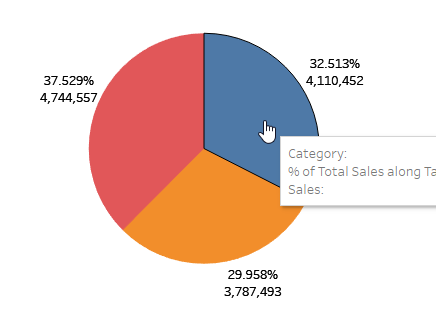
Hope it helps you.

answered May 8, 2019 by Cherukuri
• 33,050 points

Related Questions In Tableau

0 votes
2 answers

How can I add text in the centre of a Donut Chart ?

Hi, You can read this for creating a donut ...READ MORE

answered Apr 4, 2019 in Tableau by Cherukuri
• 33,050 points
• 14,872 views
0 votes
1 answer

Creating a dual axis chart with same measure in Tableau

Yes, this is possible. Drop the measure in ...READ MORE

answered May 29, 2018 in Tableau by Atul
• 10,240 points
• 10,581 views
0 votes
1 answer

Aggregating multiple column in Tableau

You can use Tableau’s inbuilt pivot method ...READ MORE

answered Jun 30, 2018 in Tableau by ffdfd
• 5,550 points
• 1,979 views